


On November 10, 2026, OpenAI opened a way for businesses to claim their profile inside ChatGPT, the assistant OpenAI says 1.2 billion people use every week. Travelers already ask ChatGPT which tour to book, what a food tour costs or which boat rental takes families, and ChatGPT answers with businesses it already knows about. Tour and activity operators should claim their business in ChatGPT now, through OpenAI’s Business Hub, so the details travelers see come from the operator. This guide covers what the feature is, how the claim process looks from the operator’s side, what to update first, and what claiming leaves unchanged.
TL;DR
- OpenAI launched Businesses in ChatGPT in beta on November 10, 2026. Businesses claim their profile at chatgpt.com/business-hub.
- A claimed profile gets a blue check, editable business details, and insights on mentions, website clicks and the conversation topics where your site is cited.
- ChatGPT may already show your business. When we searched for one of our tour operator clients in Business Hub on launch day, the business was already listed and ready to claim.
- You must own the business or be authorized to represent it, and OpenAI asks you to verify that before you can edit anything.
- Claiming gives you control of your information. OpenAI states that ChatGPT keeps making independent recommendations, so placement stays earned.
- Business Agents, the chat feature inside a profile, start with eligible ecommerce and online service businesses in the United States. Profile claiming is open to eligible businesses wherever ChatGPT is offered.
What is Businesses in ChatGPT?
Businesses in ChatGPT is OpenAI’s program that lets a company claim, verify and manage how it appears in ChatGPT. OpenAI announced it in beta on November 10, 2026. Business owners manage everything through Business Hub, a dashboard inside ChatGPT where a verified business can update its key details and see how people engage with it. (Source: OpenAI, “Introducing Businesses in ChatGPT,” November 10, 2026)
The program has three parts:
- A claimed profile. Once verified, a business can update its details, and a blue check appears on its ChatGPT profile to show it has been claimed.
- Insights. Business Hub reports how often the business is mentioned in ChatGPT, how many website clicks it receives, and its discovery topics, the common themes in conversations where its website is cited.
- Business Agents. An optional chat assistant that answers customer questions using the business’s own information and guidelines the business controls.
(Source: OpenAI, Businesses in ChatGPT product page, November 10, 2026)
Why should tour operators claim their business in ChatGPT?
Tour operators should claim their business in ChatGPT because ChatGPT already describes businesses to travelers, whether or not the owner has stepped in. OpenAI’s FAQ states that ChatGPT may show information about your business when customers ask relevant questions, with or without an agent, and its policy notes that profiles may include information from other sources. (Source: OpenAI, Businesses in ChatGPT FAQ and policy, November 10, 2026)
For a tour operator, those other sources can include an old listing, a third-party review site or a reseller page with last season’s prices. A traveler planning a trip sees whatever ChatGPT has assembled. Claiming the profile puts the operator’s own business name, category, service area, hours, contact details and offerings in front of that traveler.
The insights matter too. Most operators have no view today into whether ChatGPT mentions them or what travelers were asking when it did. Business Hub’s mention counts, website clicks and discovery topics give operators a first look at that demand. OpenAI notes the insights are aggregated and only appear once there are enough conversations to meet its privacy thresholds, so a smaller operator may see limited data at first. (Source: OpenAI, “Introducing Businesses in ChatGPT,” November 10, 2026)
How do you claim your business in ChatGPT?
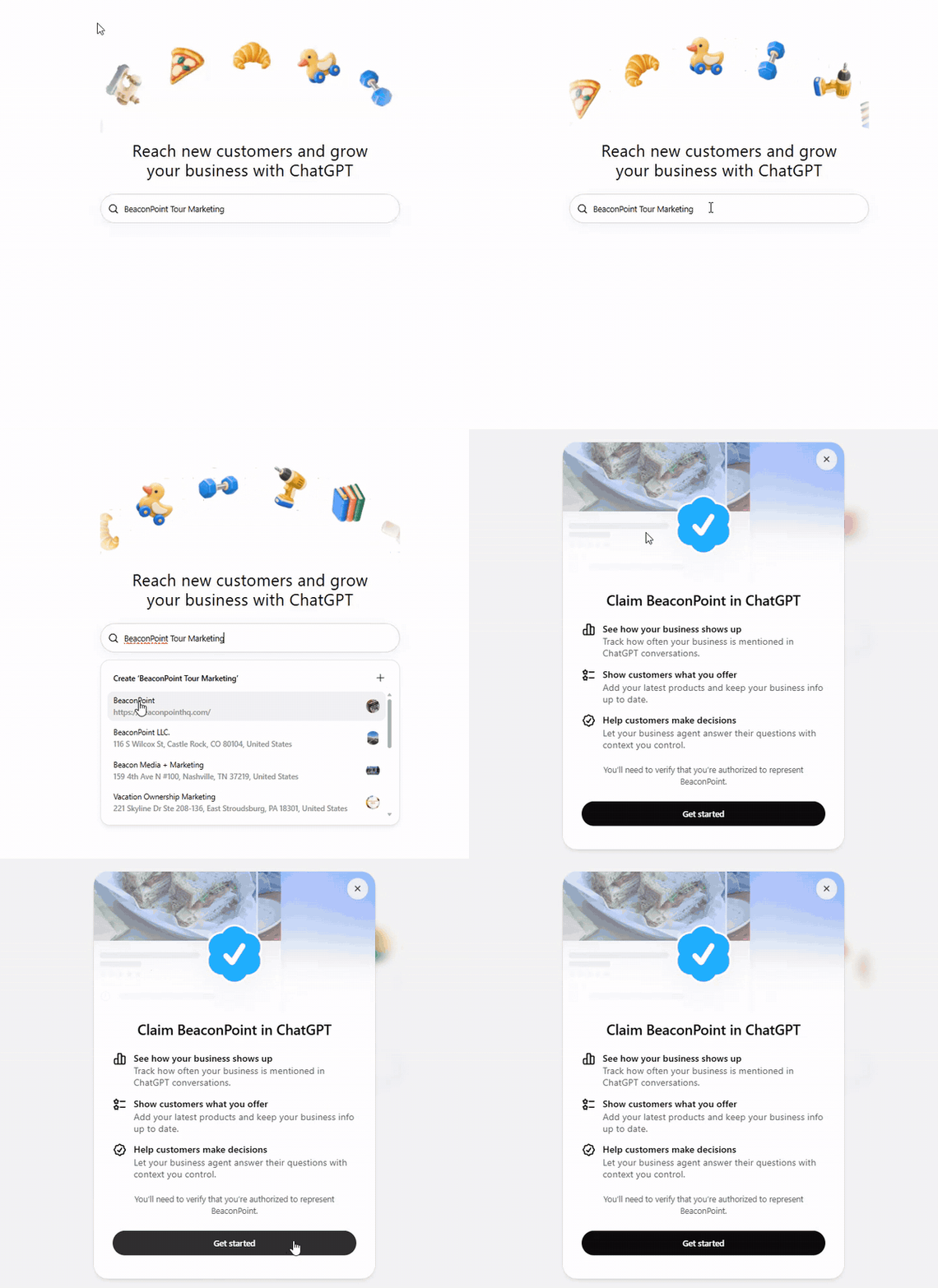
You claim your business in ChatGPT by signing in at chatgpt.com/business-hub, searching for your business name, and verifying that you are authorized to represent it. Here is what the process looked like when we ran it for a tour operator client on November 10, 2026.
- Sign in to ChatGPT and open Business Hub. Go to chatgpt.com/business-hub. The page opens with a single search box under the line “Reach new customers and grow your business with ChatGPT.” Sign in with an account your business owns, such as a shared business email, so access stays with the company.
- Search for your business name. As you type, Business Hub searches the businesses ChatGPT already knows. The results also include a Create option for a business that has no listing yet.
- Select your business. A claim window opens with a blue check and three benefits: see how your business shows up, show customers what you offer, and help customers make decisions.
- Verify you are authorized. The window states that you will need to verify you are authorized to represent the business. Select Get started and follow OpenAI’s verification steps.
- Update your details. Once verified, review every field before you do anything else.
A few rules apply before you start. OpenAI says claiming is initially available to eligible businesses with a website, and eligibility depends on factors including industry, location and OpenAI’s verification and integrity checks. Existing OpenAI Enterprise customers and advertisers can claim through their OpenAI representative instead. (Source: OpenAI, Businesses in ChatGPT FAQ, November 10, 2026)
What should tour operators update first after claiming?
Tour operators should update the details travelers act on first: business name, category, service area or meeting point, hours, contact details and the tours offered. OpenAI’s policy lists these fields and requires that every one truthfully represents the business and stays current. (Source: OpenAI, Businesses in ChatGPT policy, November 10, 2026)
| Field | What to enter | Why it matters for a tour operator |
|---|---|---|
| Business name | Your exact trading name | Keeps your name identical across ChatGPT, your website and your Google Business Profile |
| Category | The specific experience you run, such as walking food tour or pontoon boat rental | Describes your business the way travelers phrase their questions |
| Address or service area | Your meeting point or departure location, plus the area you serve | Travelers ask by neighborhood, city and region |
| Hours | Season dates and daily operating hours | Prevents ChatGPT from sending winter travelers to a closed season |
| Contact details | Phone, email and website | Every click to your site is a chance at a direct booking |
| Products or services | Each tour by name, with a short plain description | Gives ChatGPT your own words to describe each experience |
Two policy points deserve attention. OpenAI prohibits fabricated reviews or endorsements and claims that hide fees or conditions, and links must lead where they say they lead. (Source: OpenAI, Businesses in ChatGPT policy, November 10, 2026) For operators, that means listing prices with any booking fees included in the description, and linking each tour to its real page on your website.
Seasonal operators should set a calendar reminder to revisit the profile at each season change. OpenAI requires information to be kept current, and an out-of-date schedule costs bookings in any channel.
Does claiming your business improve your ranking in ChatGPT?
Claiming your business improves the accuracy of your profile, and placement stays with ChatGPT. OpenAI states that ChatGPT continues to make independent recommendations and comparisons, and that claiming does not guarantee higher placement or sales. (Source: OpenAI, Businesses in ChatGPT FAQ, November 10, 2026)
What claiming does is make your information accurate and current, and give you data you have never had. The pages ChatGPT cites still come from the open web, so the work that earns a mention stays the same: tour pages written from first-hand knowledge, clear prices and times near the top, and consistent business details across your website, Google Business Profile and listings. The profile and that groundwork support each other.
Businesses that want paid reach can also sponsor a Business Agent as the destination for ChatGPT Ads, and OpenAI labels those placements as sponsored and separate from ChatGPT’s answers. (Source: OpenAI, “Introducing Businesses in ChatGPT,” November 10, 2026)
Can tour operators use a ChatGPT Business Agent?
Business Agents are available to eligible ecommerce and online service businesses in the United States as of November 10, 2026, and OpenAI plans to expand them to more business types over time. Profile claiming has a wider reach: it is open to eligible businesses wherever ChatGPT is offered. (Source: OpenAI, Businesses in ChatGPT FAQ, November 10, 2026)
A Business Agent lets a traveler start a separate, clearly labeled conversation with the business from its ChatGPT profile and ask follow-up questions, answered from the product and policy information the business provides. OpenAI publishes the eligible categories in its Business Agents policy. Whether a given tour or activity business qualifies today is a question for that policy and Business Hub itself, so claim the profile first and check the agent option from inside your dashboard.
FAQ
What if my business is missing from Business Hub search?
Business Hub offers a Create option in the search results. OpenAI’s policy prohibits fake or duplicate profiles, so search for your exact business name and close variations before creating a new one.
Will ChatGPT show my customers’ conversations to me?
No. OpenAI states that users’ conversations and Business Agent chats are kept from businesses. Insights are aggregated and appear only when there are enough conversations to meet privacy thresholds.
Who can claim the business?
Only an owner or someone authorized to represent the business. OpenAI asks claimants to verify that authority before they can edit the profile.
Key takeaways
- OpenAI’s Businesses in ChatGPT, launched in beta November 10, 2026, lets tour operators claim and edit their profile at chatgpt.com/business-hub.
- ChatGPT may already describe your business from other sources, so claiming puts your own details in front of travelers.
- Update name, category, service area, season hours, contact details and each tour, with fees stated plainly.
- Claiming gives you accuracy and insight, while placement still depends on ChatGPT’s independent recommendations and the strength of your website.
- Check Business Agent eligibility from inside Business Hub once your profile is claimed.